下载源压缩包
1
| wget https://openresty.org/download/openresty-1.21.4.1.tar.gz
|
安装依赖
1
| sudo apt-get install libpcre3-dev libssl-dev perl make build-essential curl
|
解压源码
1
| tar -xzvf openresty-1.21.4.1.tar.gz
|
配置
1
2
| cd openresty-1.21.4.1
./configure
|
编译和安装
1
2
| make -j2
sudo make install
|
设置环境
1
2
| cd ~
export PATH=/usr/local/openresty/nginx/sbin:/usr/local/openresty/bin:$PATH
|
创建工作目录
1
2
3
| mkdir ~/work
cd ~/work
mkdir logs/ conf/
|
创建配置文件
创建conf/nginx.conf,内容如下:
1
2
3
4
5
6
7
8
9
10
11
12
13
14
15
16
| worker_processes 1;
error_log logs/error.log;
events {
worker_connections 1024;
}
http {
server {
listen 8080;
location / {
default_type text/html;
content_by_lua_block {
ngx.say("<p>hello, world</p>")
}
}
}
}
|
运行
1
| nginx -p `pwd`/ -c conf/nginx.conf
|
错误记录
运行目录错误

原因:不应该在~/work/conf目录下运行,而应该在工作目录~/work。
安装openresty时未退出nginx
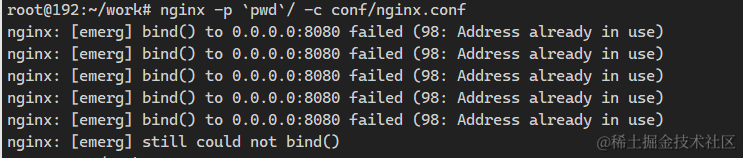
报错,显示端口8080被占用。

一查,发现是nginx,但是通过nginx -s stop退出失败。

看报错,发现nginx.pid的路径有问题。他找的不是原生的nginx.pid,而是openresty内置的nginx.pid
手动打开原生的nginx.pid,查看nginx的进程id,然后杀死进程。
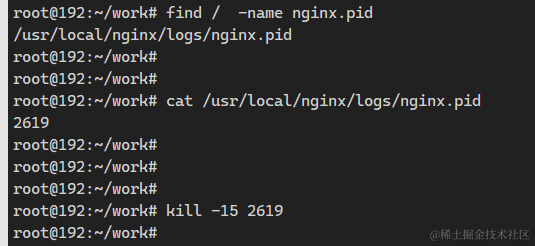
然后手动输入命令运行
1
| nginx -p `pwd`/ -c conf/nginx.conf
|
运行成功